The Software Pipeline: From Idea to Production
How modern software gets built and shipped — Waterfall vs. Agile vs. Scrum for planning work, the testing pyramid for verifying it, and DevOps (CI/CD, infrastructure as code, monitoring) for delivering it safely and often.
The Software Pipeline: From Idea to Production
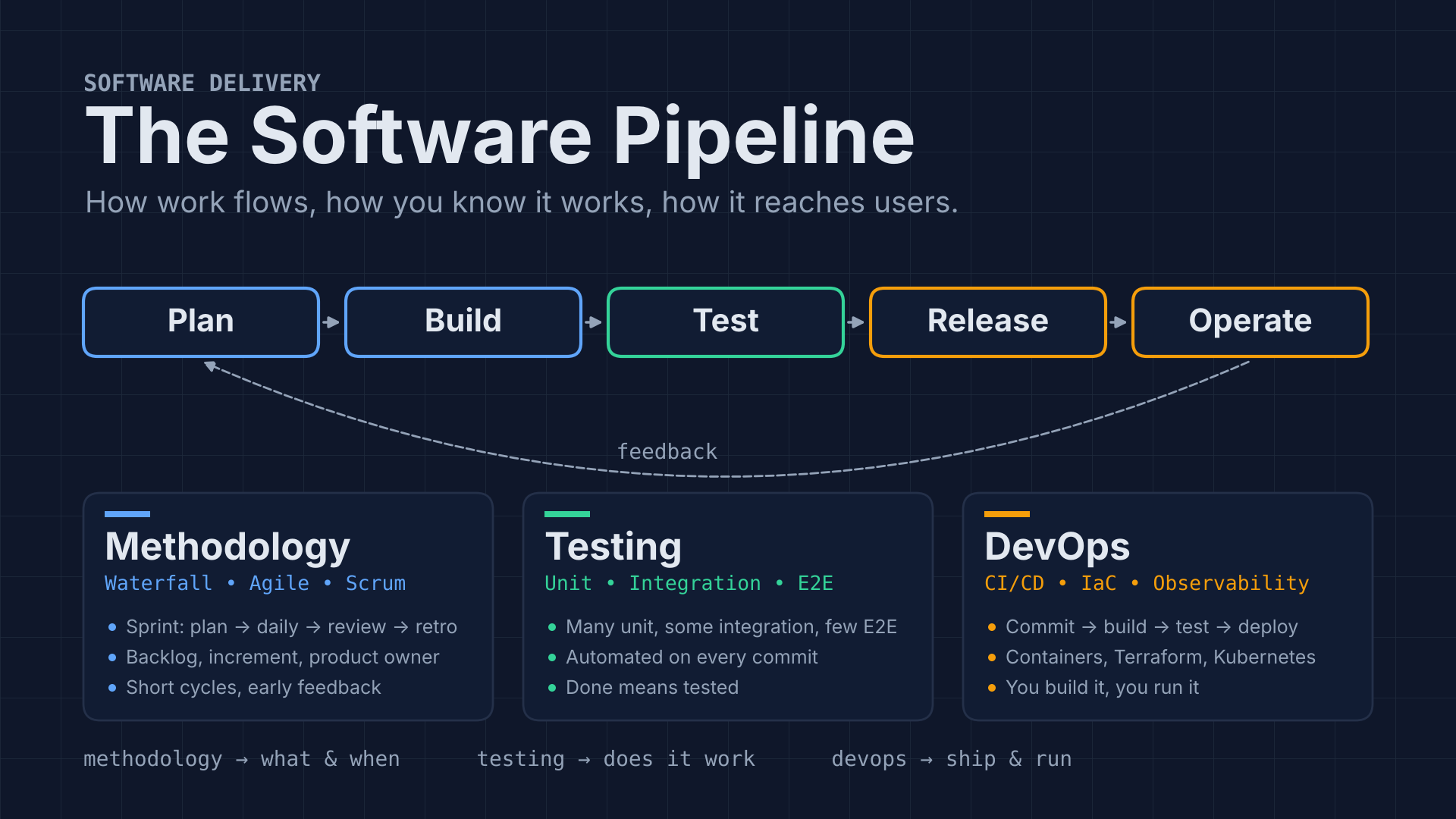
Writing code is a small part of shipping software. Between "someone had an idea" and "users are running it" sits a pipeline: how work is planned, how code is verified, and how it gets to production reliably. Three disciplines cover that pipeline end to end:
- Methodology (Waterfall, Agile, Scrum) decides how work flows — how requirements become tasks and how often you deliver.
- Software testing decides how you know it works.
- DevOps decides how it gets to users, and how you keep it running.
This article walks through all three, how they fit together, and the trade-offs each one involves.
The Big Picture
Every software project goes through the same rough stages, whatever the methodology:
flowchart LR
    A[Requirements] --> B[Design] --> C[Build] --> D[Test] --> E[Release] --> F[Operate]
    F -. feedback .-> A
What differs is how often you go around the loop and how much you take through each pass. Waterfall goes around once with everything. Agile goes around every couple of weeks with a slice. DevOps automates the right half (build → test → release → operate) so going around is cheap enough to do many times a day.
Part 1: Methodologies — How Work Flows
Waterfall
The original. Each phase finishes completely before the next begins: all requirements, then the full design, then all the code, then testing, then release.
Requirements ──▶ Design ──▶ Implementation ──▶ Verification ──▶ Maintenance
   (months)      (months)      (months)          (months)
Strengths
- Clear milestones and documentation at every stage.
- Easy to estimate and budget when the requirements really are fixed.
- Fits regulated domains (medical devices, aerospace, government contracts) where a signed-off spec is legally required.
- Works when changing course later is impossible or ruinously expensive — building hardware, for example.
Weaknesses
- Assumes you know everything up front. You almost never do.
- Feedback arrives at the end, after the most expensive work is done. A misunderstanding in requirements isn't discovered until testing, months later.
- No working software until near the finish. Stakeholders see documents, not products.
- Changes are treated as failures of planning rather than as new information.
Use it when: requirements are stable and well understood, the cost of change is extreme, or a regulator demands it.
Agile
Agile is not a process; it's a set of values, laid out in the 2001 Agile Manifesto. The four core preferences:
- Individuals and interactions over processes and tools
- Working software over comprehensive documentation
- Customer collaboration over contract negotiation
- Responding to change over following a plan
The things on the right still matter — but when forced to choose, Agile picks the left.
In practice this means: deliver working software in short cycles, get feedback, adjust. Instead of one big loop over a year, run many small loops over weeks. Requirements are expected to change, and the process is built to absorb that.
Strengths
- Feedback comes early and often, so mistakes are cheap.
- Working software exists from the first few weeks.
- Priorities can shift as the business learns.
- Teams own their process and improve it continuously.
Weaknesses
- Harder to give a fixed price and date for a fixed scope — the whole point is that scope flexes.
- Needs engaged stakeholders who show up every cycle. Without them it degrades into "waterfall in two-week chunks."
- Easy to do badly. "We're Agile" often means "we have no plan."
- Documentation can be neglected if nobody is deliberate about it.
Use it when: requirements will evolve, the product is new, or speed of learning matters more than predictability of scope.
Scrum
Scrum is the most widely used framework for doing Agile. Where Agile is a philosophy, Scrum is a concrete set of roles, events, and artifacts.
Roles
| Role | Responsibility |
|---|---|
| Product Owner | Owns the backlog. Decides what gets built and in what order. The voice of the customer. |
| Scrum Master | Owns the process. Removes blockers, coaches the team, protects it from interruptions. Not a manager. |
| Developers | Everyone who builds the product — engineers, designers, testers. Self-organizing; decide how. |
Events (the Sprint cycle)
Work happens in Sprints: fixed-length iterations, usually two weeks, never more than a month.
flowchart LR
    SP[Sprint Planning] --> D[Daily Scrum\n×10]
    D --> SR[Sprint Review]
    SR --> RT[Retrospective]
    RT --> SP
| Event | When | Purpose |
|---|---|---|
| Sprint Planning | Start of sprint | Pick backlog items for this sprint; define a Sprint Goal |
| Daily Scrum | Every day, 15 min | Sync: what's done, what's next, what's blocked |
| Sprint Review | End of sprint | Demo working software to stakeholders; gather feedback |
| Sprint Retrospective | After the review | Team reflects on how it worked and picks one improvement |
Artifacts
- Product Backlog — the ordered list of everything the product might need. Lives forever; constantly reprioritized.
- Sprint Backlog — the subset chosen for the current sprint, plus the plan to deliver it.
- Increment — the working, potentially shippable product at the end of each sprint.
Where Scrum goes wrong
- Sprints become mini-waterfalls: design in week one, code in week two, test "next sprint."
- The Daily Scrum becomes a status report to a manager instead of a team sync.
- Velocity (story points per sprint) gets treated as a productivity metric and gamed.
- The Retrospective is skipped because "we're busy" — which is exactly when it's needed.
Kanban, briefly
The other common Agile framework. No sprints; work flows continuously through columns on a board (To Do → In Progress → Review → Done), with a limit on work in progress per column. Better than Scrum for support teams, ops, and anything with unpredictable incoming work. Many teams blend the two.
Comparison
| Waterfall | Agile (general) | Scrum | |
|---|---|---|---|
| Cycle length | Whole project | Short iterations | Fixed sprints (1–4 weeks) |
| Requirements | Fixed up front | Evolve continuously | Reprioritized every sprint |
| First working software | End of project | Weeks in | End of sprint 1 |
| Handling change | Change request, formal | Welcome | Added to backlog, next sprint |
| Documentation | Heavy | As needed | Backlog + increment |
| Best for | Fixed scope, regulated, hardware | Evolving products | Product teams, 3–9 people |
| Risk | Late discovery of problems | Scope drift, no plan | Ritual without substance |
Part 2: Software Testing — How You Know It Works
Testing is how a team turns "I think it works" into "I know it works," and keeps that confidence as the code changes. Every methodology needs it; Agile and DevOps depend on it, because you can't release every two weeks (or every hour) if verifying a release takes a month.
The testing pyramid
The standard model for how much of each kind of test to write:
            ╱ ╲
           ╱ E2E╲          few — slow, brittle, high confidence
          ╱───────╲
         ╱Integration╲     some — components working together
        ╱─────────────╲
       ╱  Unit tests   ╲   many — fast, isolated, cheap
      ╱─────────────────╲
Unit tests check one function or class in isolation. Fast (milliseconds), deterministic, run on every save. The bulk of your suite.
def test_discount_applies_ten_percent_for_premium():
    assert calculate_discount("premium", 100) == 10
Integration tests check that pieces work together: your code against a real database, two services talking, an API endpoint through its full stack. Slower, more setup, catch a different class of bug.
End-to-end (E2E) tests drive the whole system the way a user would — a browser clicking through checkout. Highest confidence, slowest, most fragile. Keep them few and focused on critical paths.
The pyramid shape matters. An inverted pyramid (mostly E2E) means a slow, flaky suite nobody trusts. Too few integration tests means units that pass individually and fail together.
Types of testing
| Type | Question it answers | Who usually does it |
|---|---|---|
| Unit | Does this function do what it says? | Developers |
| Integration | Do these components work together? | Developers |
| End-to-end / System | Does the whole product work for a user? | QA + developers |
| Acceptance | Does it meet the requirement the customer asked for? | Product owner / QA |
| Regression | Did this change break anything that used to work? | Automated suite |
| Smoke | Is the build fundamentally alive? | Automated, right after deploy |
| Performance / Load | Does it hold up under real traffic? | Performance engineers |
| Security | Can it be exploited? | Security team, scanners |
| Usability | Can people actually use it? | UX researchers |
| Exploratory | What did we not think to test? | Human testers, manually |
Functional vs. non-functional
Functional tests check what the system does: given this input, produce this output. Unit, integration, acceptance.
Non-functional tests check how well: speed, scale, security, accessibility, reliability. These are routinely neglected until something falls over in production.
Manual vs. automated
Automate anything you'll run more than twice. That's most of it: unit, integration, regression, smoke, performance. The suite becomes the safety net that makes refactoring and frequent releases possible.
Keep humans for exploratory testing — unscripted, curious poking at the product — and usability. A script only checks what someone thought to write down; a person finds the thing nobody imagined.
Test-Driven Development (TDD)
Write the test first, watch it fail, write just enough code to pass, refactor. Repeat.
Red ──▶ Green ──▶ Refactor ──▶ Red ──▶ ...
The benefit isn't really the tests — it's that writing the test first forces you to decide what the code should do before you write it, and keeps every unit small enough to test. Not every team does strict TDD, but every good team writes tests alongside code, not after.
Testing in each methodology
- Waterfall: testing is a phase, after all the code is written. Bugs found late are expensive. QA is often a separate department.
- Agile/Scrum: testing happens inside every sprint, on every story. "Done" means tested. Testers sit with developers.
- DevOps: testing is automated and runs on every commit, in the pipeline. Nobody deploys without green tests.
Part 3: DevOps — How It Gets to Users
DevOps is the practice of breaking down the wall between development (who writes the code) and operations (who runs it). Traditionally, developers threw releases over the wall and ops dealt with the fallout. DevOps makes one team responsible for both building and running software — and automates the path between them.
The core idea: if deploying is painful, do it more often until it isn't. Automate every step so a release is a routine, low-risk event instead of a quarterly ordeal.
CI/CD — the pipeline itself
This is the mechanical heart of DevOps.
flowchart LR
    C[Commit] --> B[Build] --> T[Automated tests] --> P[Package]
    P --> S[Deploy to staging] --> A[Acceptance / smoke tests] --> D[Deploy to production]
    D --> M[Monitor]
    M -. alerts, metrics .-> C
Continuous Integration (CI): every commit is automatically built and tested. Broken builds are caught in minutes, not at the end of the sprint. Developers merge small changes often, so integration problems stay small.
Continuous Delivery (CD): every change that passes CI is automatically packaged and deployed to a staging environment, ready for production at the push of a button. Release becomes a business decision, not a technical project.
Continuous Deployment (also CD, confusingly): the same, but the push of a button is removed — every passing change goes straight to production. Requires excellent automated testing and the ability to roll back instantly.
A minimal CI configuration, in GitHub Actions:
name: CI
on: [push, pull_request]

jobs:
  test:
    runs-on: ubuntu-latest
    steps:
      - uses: actions/checkout@v4
      - uses: actions/setup-python@v5
        with:
          python-version: "3.12"
      - run: pip install -r requirements.txt
      - run: pytest --cov
      - run: ruff check .
Every push now builds, tests, and lints. If any step fails, the pull request is blocked.
Infrastructure as Code (IaC)
Servers, networks, databases, and permissions are defined in files (Terraform, Pulumi, CloudFormation, Ansible) and created by running those files — not by clicking through a console. Infrastructure becomes versioned, reviewable, reproducible, and identical across environments.
resource "aws_s3_bucket" "uploads" {
  bucket = "myapp-uploads-prod"
}
Containers and orchestration
Docker packages an application with everything it needs to run, so "it works on my machine" becomes "it works in this container, everywhere." Kubernetes runs those containers at scale: scheduling, scaling, restarting, rolling out new versions without downtime.
FROM python:3.12-slim
WORKDIR /app
COPY requirements.txt .
RUN pip install -r requirements.txt
COPY . .
CMD ["gunicorn", "app:server"]
Monitoring and observability
Deploying is half the job; knowing what happened next is the other half. Three pillars:
- Metrics — numbers over time: request rate, error rate, latency, CPU. (Prometheus, Datadog, CloudWatch)
- Logs — what each component said happened. (Elasticsearch, Loki, Splunk)
- Traces — one request's journey across every service it touched. (Jaeger, OpenTelemetry)
Plus alerting that wakes someone up when the numbers go wrong, and dashboards so you can see the state of production at a glance.
Safer deployment strategies
- Blue/green: run two identical production environments; deploy to the idle one, switch traffic, keep the old one for instant rollback.
- Canary: send 1% of traffic to the new version, watch the metrics, ramp up gradually. Problems hit 1% of users, not 100%.
- Feature flags: deploy code dark, turn features on per user, per region, or per percentage — and off again without a redeploy.
DevOps culture
The tools are the visible part. The culture is what makes them work:
- Shared ownership. "You build it, you run it." Developers carry pagers.
- Blameless postmortems. When production breaks, the question is "what in the system allowed this?" not "who did it?"
- Small batches. Small changes are easier to test, review, deploy, and roll back than big ones.
- Measure everything. The four DORA metrics — deployment frequency, lead time for changes, change failure rate, time to restore — are the standard yardstick for how well a pipeline performs.
DevSecOps
Security shifted left into the pipeline: dependency scanning, static analysis, secret detection, and container scanning run automatically on every commit instead of as a pre-release audit. Same principle as testing: find problems when they're cheap.
How the Three Fit Together
flowchart TB
    subgraph Methodology ["Methodology — how work flows"]
        PB[Product backlog] --> SP[Sprint]
    end
    subgraph Testing ["Testing — how you know it works"]
        U[Unit] --> I[Integration] --> E[E2E]
    end
    subgraph DevOps ["DevOps — how it reaches users"]
        CI[CI] --> CD[CD] --> OB[Observe]
    end
    SP --> U
    E --> CI
    OB -. feedback .-> PB
- Scrum decides what the team builds this fortnight and gives it a rhythm for feedback.
- Testing makes each increment trustworthy, so "done" actually means done.
- DevOps makes releasing that increment fast and safe enough to do every sprint — or every day.
Each one enables the others. Agile without automated testing collapses into manual regression crunch. CI/CD without tests just ships bugs faster. Testing without short cycles catches problems too late to matter.
A mature modern team typically looks like this: two-week sprints with a prioritized backlog; tests written with every story and run on every commit; a pipeline that deploys to staging automatically and to production with one click (or none); monitoring that feeds real usage data back into the next sprint's planning.
Choosing for Your Situation
| Situation | Methodology | Testing emphasis | DevOps emphasis |
|---|---|---|---|
| Startup, new product, unclear market | Scrum or Kanban | Unit + a few E2E on core flows | CI from day one; simple CD |
| Enterprise product, large team | Scrum (scaled) | Full pyramid + performance | Full CI/CD, canaries, strong observability |
| Regulated (medical, finance, aviation) | Waterfall or hybrid | Heavy acceptance + traceability | Controlled CD with audit trail |
| Internal tools, small team | Kanban | Unit + smoke | Lightweight CI, manual deploy is fine |
| Ops / support / maintenance | Kanban | Regression suite | Strong monitoring, fast rollback |
Summary
The software pipeline has three layers, and they answer three questions:
- How does work flow? Waterfall for fixed scope and high change cost; Agile for evolving products; Scrum as the most common concrete way to do Agile, with sprints, defined roles, and regular feedback.
- How do we know it works? A pyramid of automated tests — many unit, some integration, few end-to-end — plus humans for exploratory and usability testing.
- How does it reach users? DevOps: CI/CD automation, infrastructure as code, containers, monitoring, and a culture of shared ownership and small, frequent, reversible changes.
None of these is optional in modern software, and none works well alone. Get all three running together and shipping becomes boring — which is exactly the goal.