CSV, Excel, and JSON: Choosing the Right File for Your Data
What CSV, Excel, and JSON files actually are, where each one shines and breaks, the pitfalls that corrupt data silently (dates, leading zeros, encodings), and a simple rule for picking the right format.
CSV, Excel, and JSON: Choosing the Right File for Your Data
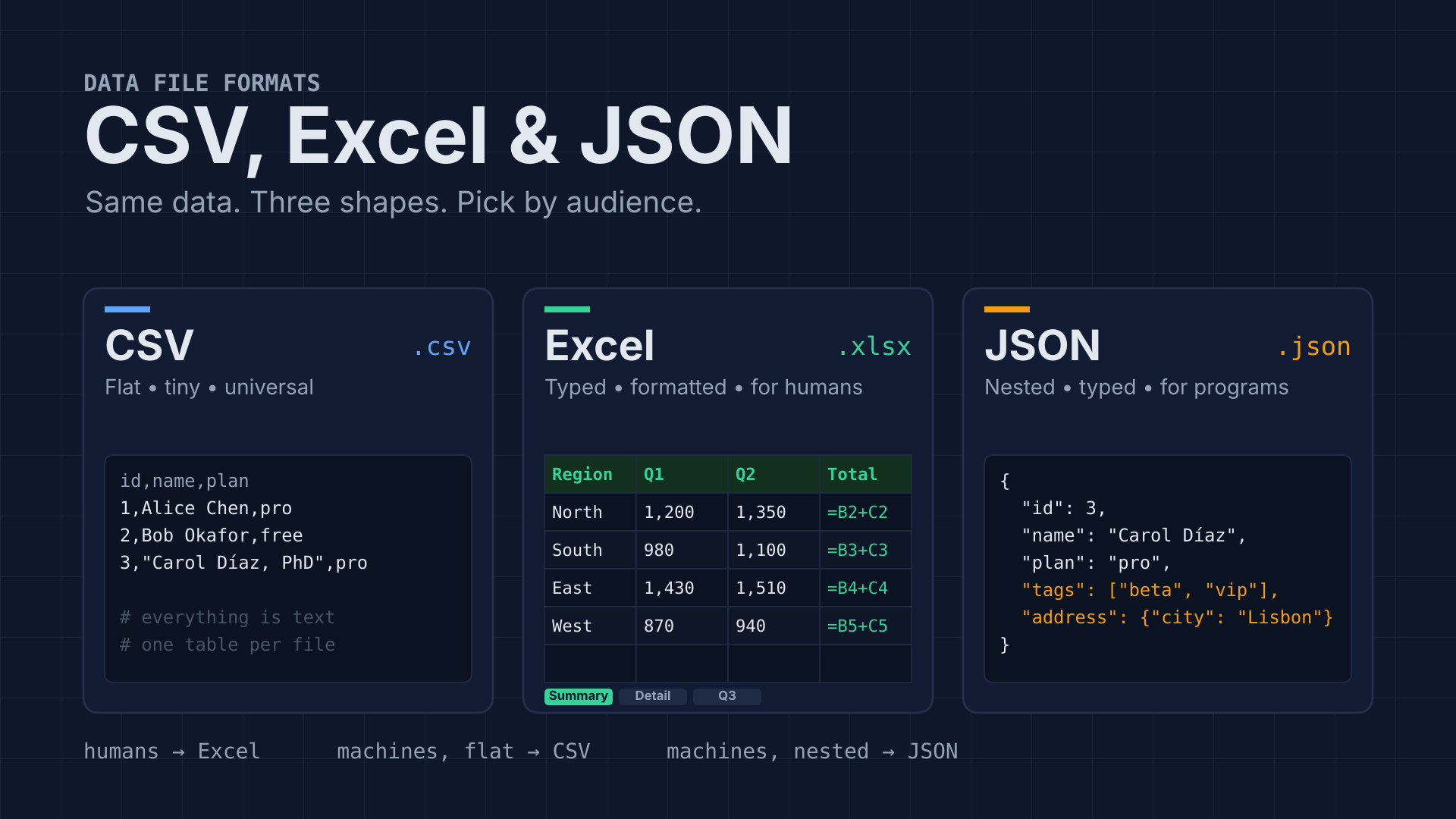
Three file formats carry most of the world's everyday data. CSV moves it between systems, Excel is where people look at it, and JSON is how programs talk about it. They overlap enough that people treat them as interchangeable — and that's where the trouble starts: dates that silently turn into numbers, leading zeros that vanish, nested data flattened into a mess.
This article explains what each format actually is, what it does well, where it breaks, and how to pick the right one. Code examples use Python, which has first-class support for all three.
The One-Line Summary
| Format | What it is | Best at |
|---|---|---|
| CSV | Plain text, one record per line, fields separated by commas | Moving flat tabular data between tools |
| Excel | Binary/zipped workbook with sheets, formulas, formatting, types | Humans viewing, editing, and analyzing data |
| JSON | Text format for nested key-value data | Programs exchanging structured data, APIs, config |
Everything else in this article is detail on those three rows.
CSV — Comma-Separated Values
What it looks like
id,name,email,signup_date,plan
1,Alice Chen,alice@example.com,2026-03-14,pro
2,Bob Okafor,bob@example.com,2026-03-15,free
3,"Carol Díaz, PhD",carol@example.com,2026-03-17,pro
That's the whole thing. A header row (optional, but you should always include one), then one record per line, fields separated by commas. If a field contains a comma, a quote, or a newline, wrap it in double quotes — like Carol's name above.
Strengths
- Universal. Every spreadsheet, database, programming language, and data tool on earth can read it. It will still be readable in fifty years.
- Tiny. No markup, no metadata, no formatting. A million rows of CSV is often a tenth the size of the same data in Excel.
- Streamable. You can process a 50 GB CSV line by line without loading it into memory. Try that with a workbook.
- Diffable. It's plain text, so Git can show you exactly which rows changed.
- Human-readable in a pinch. Open it in any text editor.
Weaknesses
- No types. Everything is a string. Is
01234a number or a ZIP code? Is3/4a date, a fraction, or text? The file doesn't say; the reader guesses — and Excel is a famously bad guesser. - No structure. One flat table per file. If your data has nested parts (an order with multiple line items), you either flatten it into repeated rows or split it across files.
- The format isn't quite standard. RFC 4180 exists, but in practice you'll meet semicolon-delimited "CSVs" (common in Europe, where the comma is the decimal separator), tab-delimited ones, different line endings, and files with and without a header. Always check before parsing.
- Encoding trouble. Older tools write Latin-1; newer ones write UTF-8; Excel sometimes wants a byte-order mark to detect UTF-8 correctly. Accented names get mangled constantly.
- No formulas, no formatting, no multiple sheets. Data only.
Reading and writing
import csv

# Reading
with open("users.csv", newline="", encoding="utf-8") as f:
    for row in csv.DictReader(f):
        print(row["name"], row["plan"])

# Writing
rows = [
    {"id": 1, "name": "Alice Chen", "plan": "pro"},
    {"id": 2, "name": "Bob Okafor", "plan": "free"},
]
with open("out.csv", "w", newline="", encoding="utf-8") as f:
    writer = csv.DictWriter(f, fieldnames=["id", "name", "plan"])
    writer.writeheader()
    writer.writerows(rows)
For anything analytical, use pandas:
import pandas as pd
df = pd.read_csv("users.csv", dtype={"id": str})   # keep leading zeros
df.to_csv("out.csv", index=False)
Use CSV when
- You're exporting from one system to import into another.
- The data is a single flat table.
- File size or streaming matters.
- You want something a non-programmer can open in Excel and a programmer can parse in three lines.
Excel — .xlsx Workbooks
What it actually is
Despite appearances, a modern .xlsx file is a ZIP archive of XML files. Rename one to .zip and unzip it; you'll find a folder for each sheet, a shared-strings table, styles, and metadata. The older .xls format was a proprietary binary format and should be avoided for anything new.
An Excel file is not just data. It carries:
- Multiple sheets in one file.
- Cell types: numbers, text, dates, booleans, and errors are distinct.
- Formulas, which are stored alongside their last computed value.
- Formatting: fonts, colors, column widths, number formats, conditional formatting.
- Objects: charts, pivot tables, images, data validation, comments.
Strengths
- The best tool ever built for a human to look at a table. Sort, filter, color, chart, pivot — no code required.
- Typed cells. A date is a date. A number keeps its precision. Leading zeros survive if the cell is text.
- Self-contained reports. One file can hold raw data, a summary sheet, and the charts, and it looks the same on the recipient's machine.
- Formulas travel with the data. The recipient can see how a number was computed and change the inputs.
- Everyone in business already has it. Sending a
.xlsxrequires zero explanation.
Weaknesses
- Heavy. Much larger than CSV for the same data, and loading requires parsing XML — slow for big files.
- Row limit. 1,048,576 rows per sheet. Real datasets blow past this regularly.
- Not streamable. Libraries generally load the whole workbook into memory.
- Not diffable. It's a zipped binary; version control sees it as an opaque blob.
- Silent data corruption. Excel's eagerness to "help" is legendary: it converts
SEPT2(a human gene) to a date, turns1E5into 100000, strips leading zeros from ZIP codes, and rounds anything past 15 significant digits. The gene-naming problem got so bad that in 2020 the HUGO Gene Nomenclature Committee renamed 27 human genes to stop Excel mangling them. - Formulas can lie. A cached value may be stale if the file was last saved by a tool that doesn't recalculate. Always check whether you're reading the formula or its result.
- Hard to generate correctly from code. Writing a good-looking workbook with proper types, widths, and formats takes far more effort than writing a CSV.
Reading and writing
import pandas as pd

# Read one sheet
df = pd.read_excel("report.xlsx", sheet_name="Q3")

# Read every sheet into a dict of DataFrames
sheets = pd.read_excel("report.xlsx", sheet_name=None)

# Write several DataFrames to one workbook
with pd.ExcelWriter("out.xlsx", engine="openpyxl") as writer:
    summary.to_excel(writer, sheet_name="Summary", index=False)
    detail.to_excel(writer, sheet_name="Detail", index=False)
For formatting, formulas, and fine control, use openpyxl directly:
from openpyxl import Workbook
from openpyxl.styles import Font

wb = Workbook()
ws = wb.active
ws.title = "Sales"
ws.append(["Region", "Q1", "Q2", "Total"])
ws.append(["North", 1200, 1350, "=B2+C2"])
ws.append(["South", 980, 1100, "=B3+C3"])
for cell in ws[1]:
    cell.font = Font(bold=True)
ws.column_dimensions["A"].width = 14
wb.save("sales.xlsx")
Use Excel when
- A person will open the file and look at it, edit it, or build on it.
- You need multiple related tables in one deliverable.
- Formatting, formulas, or charts are part of the result.
- The audience is business users who live in spreadsheets.
Don't use it as a database, an API payload, or an archival format.
JSON — JavaScript Object Notation
What it looks like
{
  "id": 3,
  "name": "Carol Díaz",
  "email": "carol@example.com",
  "signup_date": "2026-03-17",
  "plan": "pro",
  "tags": ["beta", "early-adopter"],
  "address": {
    "city": "Lisbon",
    "country": "PT"
  }
}
JSON has exactly six data types: objects ({}), arrays ([]), strings, numbers, booleans, and null. Objects and arrays can nest arbitrarily deep. That's the whole specification, and it's why every language speaks it natively.
Strengths
- Nested structure. An order with line items, a user with addresses, a config with sections — all expressed naturally. CSV can't do this without contortions.
- Lightweight types. Strings, numbers, booleans, and null are distinguished.
"01234"and1234are different things. - The language of APIs. Virtually every web API sends and receives JSON. If your data is going to or from a web service, this is the format.
- Native in JavaScript, and a one-liner in every other language.
- Schema-flexible. Records in the same array can have different fields. That's a strength when data varies, and a weakness when you wanted consistency.
- Human-readable when pretty-printed, and diffable in version control.
Weaknesses
- No date type. Dates are strings by convention (usually ISO 8601:
"2026-03-17T14:30:00Z"). Every parser has to agree on the convention. - Verbose for tabular data. Every record repeats every key. A million-row table as a JSON array of objects is several times the size of the same CSV.
- No comments. Painful for config files; this is why JSON5, JSONC, YAML, and TOML exist.
- Must be fully loaded to parse — unless you use the newline-delimited variant (see below).
- Precision pitfalls. JSON numbers are nominally arbitrary-precision, but JavaScript parses them as 64-bit floats. IDs above 2⁵³ get rounded. Serialize big IDs as strings.
- Not spreadsheet-friendly. Excel can import JSON through Power Query, but it's a chore, and nested data has to be flattened first.
JSON Lines
For large datasets of records, there's a popular variant: JSON Lines (.jsonl or .ndjson), where each line is one complete JSON object.
{"id": 1, "name": "Alice Chen", "plan": "pro"}
{"id": 2, "name": "Bob Okafor", "plan": "free"}
{"id": 3, "name": "Carol Díaz", "plan": "pro"}
This gets you CSV's streamability with JSON's types and nesting. It's the standard format for logs, ML training data, and bulk exports from many databases.
Reading and writing
import json

# Read
with open("user.json", encoding="utf-8") as f:
    user = json.load(f)
print(user["address"]["city"])

# Write (pretty-printed, keeps non-ASCII characters)
with open("out.json", "w", encoding="utf-8") as f:
    json.dump(user, f, indent=2, ensure_ascii=False)

# JSON Lines — stream one record at a time
with open("events.jsonl", encoding="utf-8") as f:
    for line in f:
        event = json.loads(line)
        process(event)
With pandas:
df = pd.read_json("records.json")                  # array of objects
df = pd.read_json("events.jsonl", lines=True)       # JSON Lines
df.to_json("out.json", orient="records", indent=2)
Use JSON when
- The data is nested or hierarchical.
- You're talking to or from an API, or a JavaScript front end.
- It's a configuration or settings file.
- Records vary in shape.
- You need types preserved but don't want a binary format.
Head-to-Head Comparison
| CSV | Excel (.xlsx) | JSON | |
|---|---|---|---|
| Structure | Flat table | Multiple flat tables | Nested tree |
| Data types | None (all text) | Rich (numbers, dates, text, bool) | Basic (string, number, bool, null) |
| Nesting | No | No | Yes |
| Multiple tables | No (one per file) | Yes (sheets) | Yes (nested arrays) |
| File size | Smallest | Largest | Medium–large |
| Streamable | Yes | No | Only as JSON Lines |
| Human-readable | Yes | Via Excel only | Yes |
| Human-editable | Awkward | Excellent | Awkward |
| Formulas / formatting | No | Yes | No |
| Diffable in Git | Yes | No | Yes |
| Row limit | None | ~1.05 million per sheet | None |
| Standardized | Loosely (RFC 4180) | Yes (ECMA-376) | Yes (RFC 8259) |
| Native in APIs | Rare | Never | Standard |
| Encoding issues | Frequent | Handled internally | Rare (UTF-8 by spec) |
The Pitfalls That Bite Everyone
Leading zeros. ZIP codes, phone numbers, product codes. CSV stores 01234 fine, but Excel reads it as 1234 on open. Either read the column as text explicitly or, when writing CSV for Excel users, know they'll lose it.
Dates. CSV has no date type, so write ISO 8601 (2026-11-08) — it sorts correctly as text and is unambiguous. Never write 11/08/2026; half the world reads that as 11 August. In JSON, same rule. In Excel, use real date cells, not strings.
Decimal separators. In Germany, France, and much of the world, 3,14 is pi and ; separates CSV fields. A CSV written in one locale and opened in another produces garbage. Set the delimiter explicitly in code; don't rely on defaults.
Encoding. Always write UTF-8. If Excel users will open the CSV directly, write UTF-8 with BOM (encoding="utf-8-sig" in Python) so Excel detects it.
Big numbers in JSON. IDs, timestamps in nanoseconds, anything over 2⁵³ ≈ 9×10¹⁵ — send as strings or they'll round in JavaScript.
Excel's autocorrect. If you export CSV for people to open in Excel and the data has anything that looks like a date or a scientific number, warn them or prefer .xlsx with explicit text cells.
Stale formulas. Reading an .xlsx with pandas or openpyxl gives you the cached value of a formula, computed by whatever saved the file last. If that was a script rather than Excel, the value may be empty or wrong.
How to Choose
- Will a human open it and work in it? → Excel.
- Is it going to or from an API or a JavaScript app? → JSON.
- Is the data nested? → JSON (or JSON Lines if it's big).
- Is it a flat table moving between systems? → CSV.
- Is it a flat table, huge, and processed by code? → CSV, or consider Parquet if you're in a data-engineering stack.
- Is it a config file? → JSON, or YAML/TOML if you need comments.
It's common and correct to use more than one. A typical pipeline pulls JSON from an API, processes it into a flat table, stores it as CSV or Parquet, and delivers a formatted Excel report to stakeholders. Each format does the job it's good at.
Summary
CSV is the lowest common denominator: simple, universal, typeless, and flat. Excel is for people: typed, formatted, multi-sheet, and dangerous to automate. JSON is for programs: nested, typed, and the native tongue of the web.
Choose by audience and shape. Data for humans goes in Excel. Data for machines goes in JSON if it's nested and CSV if it's flat. And whatever you pick, write ISO dates and UTF-8 — you'll save yourself the two most common headaches in the entire field.